English
 Arabic
 French
 Spanish
 Portuguese
 Deutsch
 Turkish
 Dutch
Dutch
 Italiano
 Russian
 Romaian
 Portuguese (Brazil)
 Greek
Greek
3D Modeling for Video Games: A Beginner's Complete Guide
Art |
2026-05-02 01:47:35
The video game industry has exploded over the last decade, and with it the demand for artists who can bring virtual worlds to life. Every character you've ever played, every weapon you've ever picked up, every environment you've ever explored — someone built that. Piece by piece, polygon by polygon, in a 3D software program.
If you've ever looked at a game world and thought "I want to make that," this guide is your starting point. Getting into 3D modeling can feel overwhelming at first, but the truth is the tools are more accessible than ever, the learning resources are mostly free, and the path forward is clearer than most people realize. You just need to know where to begin.
3D modeling is the process of building objects in a digital three-dimensional space. Those objects can be as simple as a wooden crate or as complex as a fully detailed sci-fi spaceship. In video games, those models are then optimized, textured, and dropped into a game engine like Unity, Unreal Engine, or Godot where they come alive inside the actual game world.
Here's what makes game modeling different from 3D work done for film or animation: performance matters. A movie can render a single frame for hours on a server farm. A video game has to render 60 frames per second in real time on consumer hardware. That means every model needs to look great while using as few system resources as possible.
This is why learning to optimize your work is just as important as learning to design it well. You're always balancing visual quality against technical efficiency, and the best game artists are the ones who've mastered both sides of that balance.
There are several professional tools in the market and the list can feel intimidating. The good news is you don't need all of them. You need one, and you need to go deep on it before worrying about anything else.
Blender is the clear recommendation for beginners and it's not even close. It's completely free, it's open source, it's used by independent artists and professional studios alike, and it covers the full pipeline: modeling, texturing, lighting, rigging, animation, and rendering all in one program. The community is massive, the tutorials are everywhere, and the software gets better with every update.
Once you're more established, you might explore Autodesk Maya, which is the industry standard at larger studios, or ZBrush, which is the go-to tool for high-detail digital sculpting of characters and creatures. But for now, pick Blender and commit to it. Jumping between tools too early is one of the fastest ways to slow your progress.

Before you start dreaming about building full game environments or detailed characters, there are foundational concepts that will make everything else click. Rush past these and you'll hit a wall. Master them and everything becomes clearer.
1. Navigating 3D space Before you can build anything, you need to feel comfortable moving around in a three-dimensional environment. Rotating the view, moving objects, scaling elements up and down, and understanding the X, Y, and Z axes are the very basics. This feels awkward for a few days and then becomes second nature.
2. Working with primitives Cubes, spheres, cylinders and planes are your building blocks. Almost every 3D model starts from one of these basic shapes. Learning to manipulate them, combine them, and push them into new forms is where modeling actually begins.
3. Topology Topology refers to how the polygons of your model are arranged and distributed. Good topology makes your model easier to edit, easier to animate, and better performing in a game engine. Bad topology creates distortion, visual errors, and problems down the line. It's one of those concepts that separates beginners from intermediate artists.
4. UV Mapping When you want to put a texture on a 3D model, you first need to "unwrap" it, essentially flattening the surface of the 3D object into a 2D layout so textures can be applied correctly. It's like unfolding a cardboard box into a flat pattern. Not the most exciting part of the process but absolutely essential.
5. Materials and Textures This is where your models stop looking like grey plastic and start looking like metal, wood, fabric, stone, or skin. Textures give surfaces their color, detail, wear, and personality. Combined with good lighting, a well-textured model is the difference between something that looks like a student project and something that looks like it belongs in a shipped game.
You'll hear these two terms constantly and understanding them early will save you a lot of confusion.
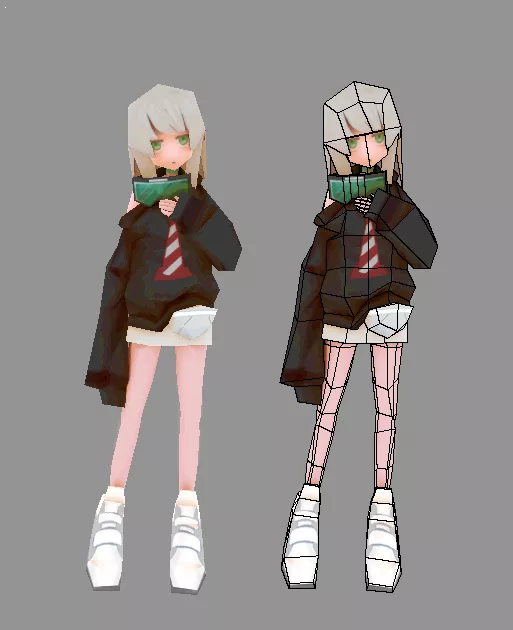
Low poly models use fewer polygons and are designed to be efficient. They're the models that actually go into the game and run in real time. Performance is the priority here.
High poly models use vastly more polygons and capture extreme detail. They're typically used for cinematic sequences, promotional artwork, or a technique called baking, where the fine detail from a high poly model gets transferred onto the surface texture of a low poly model.
In professional workflows, both are used together. You sculpt the detail at high poly, bake it down to low poly, and end up with a game-ready asset that looks far more detailed than its polygon count would suggest. Learning this pipeline is one of the most valuable skills you can develop as a game artist.

The most common mistake beginners make is trying to build something massive on day one. A full character. A whole environment. An entire weapon set. It always ends in frustration because the skills aren't there yet to execute the vision, and abandoning a project you were excited about is demoralizing.
Start small. Seriously small. Here are the kinds of projects that actually teach you the most in the early stages:
A medieval sword. A wooden barrel. A simple chair. A sci-fi crate. A basic room interior.
These might sound boring but they're not. Each one teaches you something specific: proportions, material work, clean topology, efficient UV layouts. The skills compound, and by the time you've built ten small objects well, you have a foundation that makes the bigger projects genuinely achievable.
One habit that separates improving artists from stagnating ones: always work from references. Find real photographs of whatever you're modeling and study them carefully before you touch the software. Notice the wear on the wood. The way metal reflects light. How fabric folds under tension. Training your eye to see detail is what raises the quality of everything you produce.
3D modeling for video games is one of the most creatively rewarding skills you can develop right now. The industry is growing, the tools are free, and the community of people willing to help beginners is genuinely one of the best in any creative field.
It takes time. You will make ugly models before you make good ones. You will get frustrated with topology and confused by UV maps and wonder why your textures look wrong. That's not failure, that's the process. Every professional artist you admire went through the exact same thing.
Start with Blender. Build small things. Work from references. Stay consistent. The results will come.
Disclaimer: This post contains no affiliate links. All software and tool names mentioned belong to their respective owners. This content is for informational purposes only.